¿Cómo escuchar Radio ELE plus+ en Podcast Republic?
DATOS DE ACCESO
Feed: https://radioele.com/feed/radioeleplus
Nombre de usuario y clave de acceso:
Mismo nombre de usuario y clave de acceso con los que accedes a la web de Radio ELE. (ENG)Same username and password you use to access the Radio ELE website.(DEUT) Gleiche Benutzernamen und Passwort, mit denen du auf die Radio ELE-Website zugreifst.
*NOTA IMPORTANTE: Si tu nombre de usuario o contraseña contiene caracteres especiales como «%», «&», «$», «#» u otros similares, es posible que algunas aplicaciones de pódcast no los reconozcan correctamente. En ese caso, te recomendamos cambiarlos por letras, números u otros caracteres más comunes en tu perfil de radioele.com. Las mayúsculas pueden utilizarse sin problemas. (ENG) Important Note: If your username or password contains special characters like «%», «&», «$», «#», or similar, some podcast applications may not recognize them correctly. In such cases, we recommend replacing these characters with letters, numbers, or other more common characters in your profile on radioele.com. Uppercase letters can be used without any issues. (DEUT) Wichtiger Hinweis: Wenn dein Benutzername oder Passwort Sonderzeichen wie «%», «&», «$», «#» oder ähnliche enthält, könnten einige Podcast-Anwendungen diese möglicherweise nicht korrekt erkennen. In diesem Fall empfehlen wir, diese Zeichen in deinem Profil auf radioele.com durch Buchstaben, Zahlen oder andere gebräuchlichere Zeichen zu ersetzen. Großbuchstaben können problemlos verwendet werden.
INSTRUCCIONES
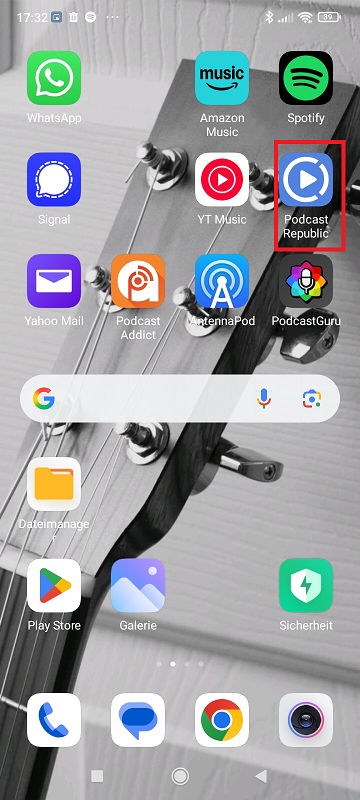
Abre la aplicación de Podcast Republic. Puedes descargarla gratis en el Play Store o App Store. / (ENG) Open the Podcast Republic app, You can download it for free from the Play Store or App Store. / (DEUT) Öffne die Podcast Republic-App. Du kannst sie kostenlos im App Store herunterladen.
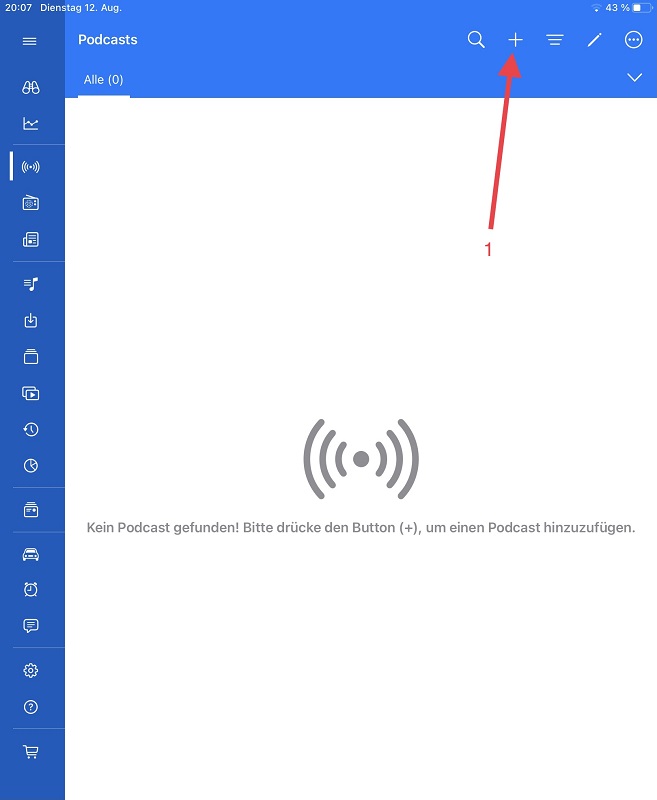
1. Haz click en el símbolo (+) en la esquina superior derecha./ (ENG) Click on the (+) in the top right corner. / (DEUT) Klicke auf (+) in der oberen rechten Ecke.
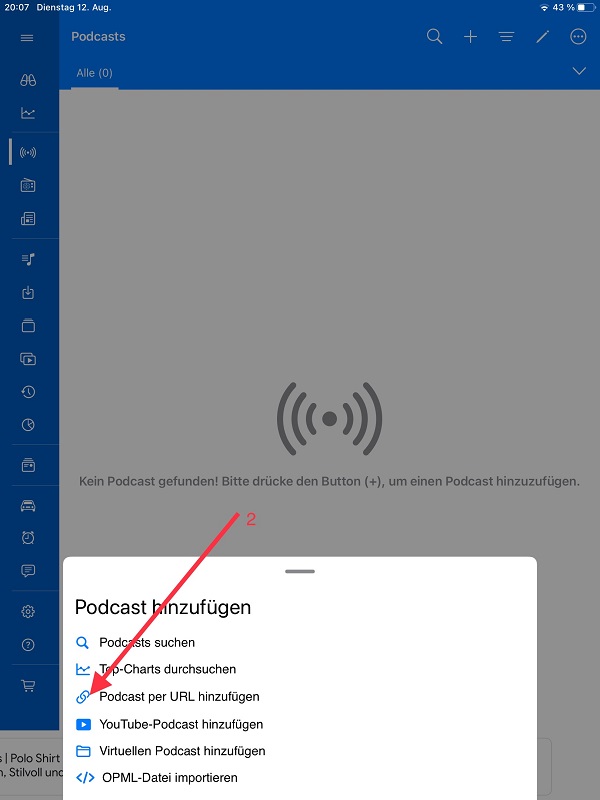
2. Haz click en «Agregar podcast por URL»./ (ENG) Click on ‘Add Podcast by URL»/ (DEUT) Klicke auf ‘Podcast per URL hinzufügen».
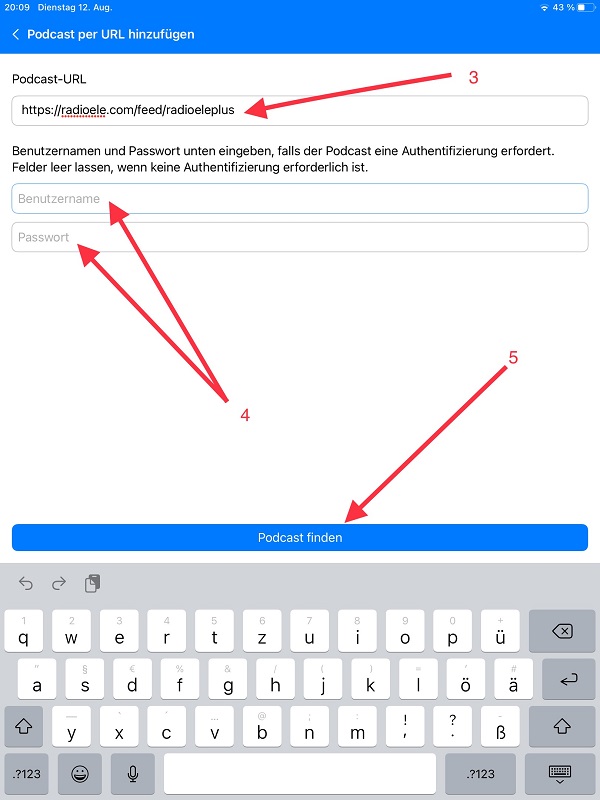
3. Escribe la dirección: https://radioele.com/feed/radioeleplus (Atención: Tienes que escribir la dirección exacta, de lo contrario no funciona)/ (ENG) Enter the address: https://radioele.com/feed/radioeleplus (Note: You must enter the exact address, otherwise it will not work)./ (DEUT) Gib die Adresse ein: https://radioele.com/feed/radioeleplus (Achtung: Du musst die genaue Adresse eingeben, sonst funktioniert es nicht).
4. Introduce tu mismo nombre de usuario y clave de acceso con los que accedes a la web de Radio ELE./ (ENG) Enter the same username and password you use to access the Radio ELE website. (DEUT) Gib den gleichen Benutzernamen und das Passwort ein, mit denen du auf die Radio ELE-Website zugreifst.
5. Haz click en «Buscar podcast». / (ENG) Click on ‘find a podcast»/ (DEUT) Klicke auf ‘Podcast finden».
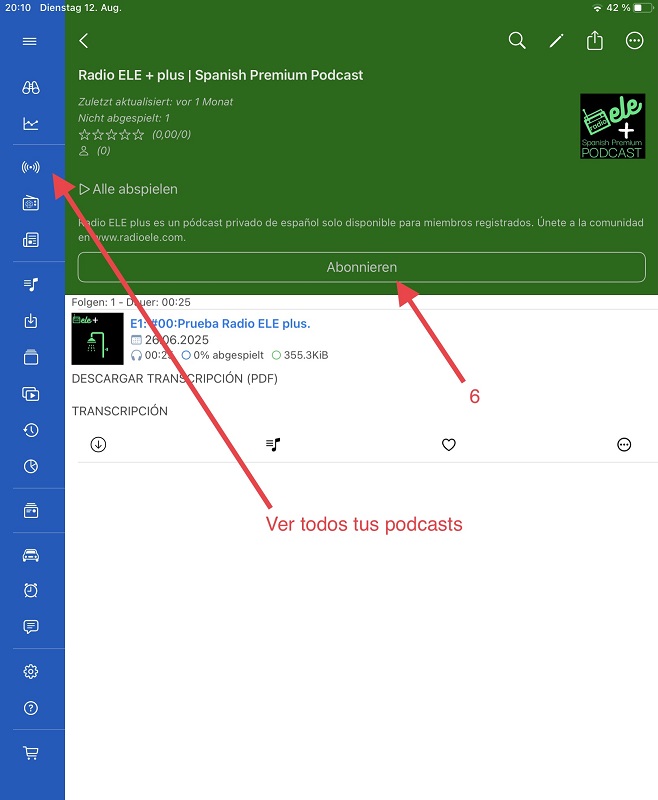
6. Haz click en «Suscribirse»./ (ENG) Click on ‘Subscribe’. / (DEUT) Klicke auf ‘Abonnieren’.
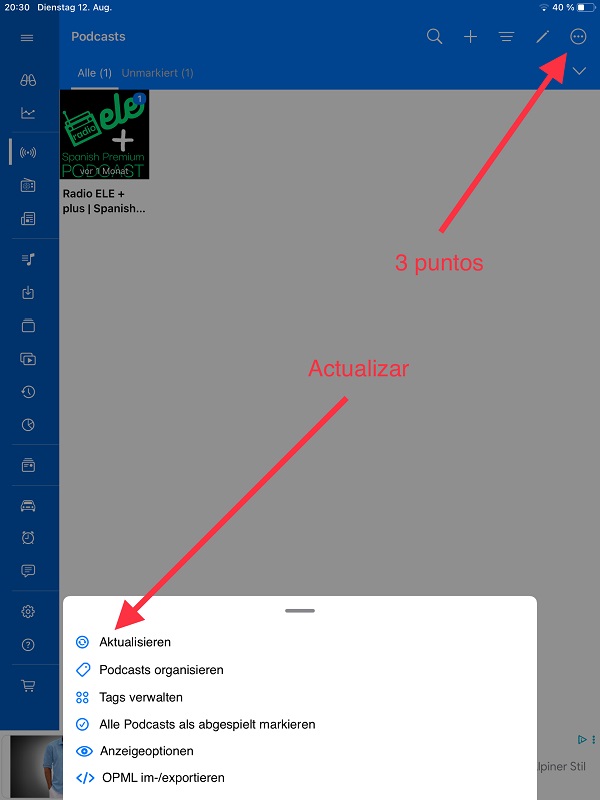
¡Listo! ¡Ya puedes escuchar todos los episodios del Podcast Premium Radio ELE plus+ en Podcast Republic! Si no puedes ver un nuevo episodio, haz click en (…) y después en «actualizar»/ (ENG) Done! You can now listen to all episodes of the Premium Radio ELE plus+ Podcast on Podcast Republic! If you cannot see a new episode, click on (…) and then «refresh.»/(DEUT) Fertig! Du kannst jetzt alle Episoden des Premium Radio ELE plus+ auf Podcast Republic hören! Wenn du eine neue Episode nicht sehen kannst, klicke auf (…) und dann auf «Aktualisieren.»
¿Tienes más preguntas?
Sí quieres saber algo más, puedes escribirme un mensaje y te contestaré con mucho gusto: contacto
Esta web utiliza cookies propias y de terceros para su correcto funcionamiento y para fines analíticos. Contiene enlaces a sitios web de terceros con políticas de privacidad ajenas que podrás aceptar o no cuando accedas a ellos. Al hacer clic en el botón Aceptar, acepta el uso de estas tecnologías y el procesamiento de tus datos para estos propósitos.
Más información